Dumped firefox 3

  • We are currently upgrading MFK. thanks! -neo

Chaitika

Silver Tier VIP
MFK Member
Feb 1, 2007
7,928
51
955
Back in action!
I had enough of waiting forever for Firefox 3 browser to load, especially after booting up. Also very demading on RAM. I started using it about 2 months ago, and finally dumped it on the weekend in favour of Opera 9. :-D World of a difference, both in speed and features. So far, I'm rather happy with Opera.

Too bad, because I loved Firefox 2.
 
I just like Firefox because it has great security features (especially the keyguard), admittedly the straight install needs some tweaking but once you do that it usually runs much faster.

Try this, Gerry, and let me know what you think.

1. Start Firefox and type: about:config in the address bar and hit Enter.
2. Type: network.http.pipe in the Filter search bar on top.
3. Double click on the network.http.pipelining string to change its value to true.
4. Double click on the network.http.pipelining.maxrequests string to change its interger value to 35.
5. Right click anywhere on the Configuration screen and select "New" and then "Boolean".
6. Enter browser.turbo.enabled as the new Boolean name and click "Ok". Now set the value of the Boolean to true.
7. Right click anywhere on the Configuration screen, select "New" and then "String".
8. Enter nglayout.initialpaint.delay as the new String name and click OK. Now set the value of the String to 0.

That should have it running pretty zippy and loading pages and images a lot quicker. I tried Opera but I couldn't find any real security features, maybe I was looking in the wrong places...?

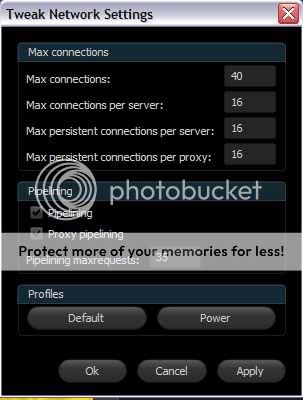
You can do most of it with this add-on, set it to Power user, still change the network.http.pipelining.maxrequests back to 35 (it sets it to 8).

browser.turbo.enabled
and nglayout.initialpaint.delay are not controlled by this add-on, so they require inserting manually.

https://addons.mozilla.org/en-US/firefox/addon/327

These changes simply allow the browser to make simultaneous requests at one time (through pipelining) and changes a few settings which reduce the time between receiving and presenting the info.


Last edited by a moderator:
I'll give those setts a whirl, BLair. It just seems like a lot of tweaking to simply run a browser effeciently.

Ron, I've heard so much about Opera in the last couple of years, I had always intended to try it.

http://www.opera.com/browser/

At first glance, it seems to provide the same level of browsing power and is as safe as any other. It's as fast as Firefox 2 was, and that was a good browser. After a couple of days of suing it, it's like I've always used it. :)
 
It just seems like a lot of tweaking to simply run a browser effeciently.
I tend to agree, Gerry. Why browsers don't provide a built in function of this I don't know.

However, the only reason the settings are not already like this is that on slower connections or older computers it may not benefit the user, general settings are more suited to the "average" connection, I say average truly meaning that it doesn't matter if the connection is slow or fast. If you have a half decent pc (even modern fairly cheap systems) it's fair to say you have enough processing power and anyone on broadband/DSL/cable, unless particularly far from their router or in a poor reception area, will have a connection fast enough to utilise these functions...

A modem connection would not benefit at all from the tweaks, it'll just chew up the bandwidth.

There are further tweaks that also speed it up (but we're really talking milliseconds after the above), however I left those out as they really only benefit the user with a very fast computer and connection - the settings I wrote out earlier should work for 95+% of broadband users.

This add-on alone will speed things up and saves you fiddling with the config manually:
https://addons.mozilla.org/en-US/firefox/addon/327

Here's mine with settings:
tweak.jpg


Simply by doing that and one other manual input it can really speed up and won't take you more than a minute or two:

about:config - "Enter"
"Right Click" - New - String - "Enter"
New String name - nglayout.initialpaint.delay - "OK"
Set Value - 0 (zero)

If you try that and it works well for you and you find it a bit zippier then let me know (or vice versa and if not what ISP you use and PC speeds - I'd be interested to know). If you want to know the rest of the tweaks that help with faster connections just ask - I'll happily explain each as well so you understand what it is that you are doing. If you already have a blisteringly fast connection you probably won't notice much of a difference without further tweaking.

I also tried Opera for a while and it is a nice pokey little browser, I just couldn't find the security add-ons that I really utilize Firefox for. Especially NoScript, Keyguard and RefControl. Find me that on Opera and I will (seriously) use it. I found a load of cool widget type utilities, as I say I may have been looking in the wrong places for security add-ons.

I run ver 3.0.6 too, Rob, and the full range of tweaks has worked for me.

 
Last edited by a moderator:
Has Opera worked out it's compatibility issues? I used to use Opera exclusively, loved it, but got tired of sites looking weird and Java not working. Switched to 'Fox and have used it since then, and like it a lot. But miss those tiled windows in Opera instead of the tabs in FF.
 
Ed, I'm not seeing any compatibility issues with firefox, although sometimes I'll get to see some interesting code while pages load. :)
 
MonsterFishKeepers.com