

oh the hatred for your avatar...............................the horror...........................anyways, I hate that if I ignore someone, sure you cant see thier posts, but you can see they posted, then you just know damn well they said something foul about you, then you run and un ignore them to see what they said, then its nothing and you get pissed and run put them back on your ignore list. Then the mind hump hell starts all over and you need someone to slap you in the head.
Important Forum Announcement: How to Use the Ignore Feature
- Thread starter Peanut_Power
- Start date
You are using an out of date browser. It may not display this or other websites correctly.
You should upgrade or use an alternative browser.
You should upgrade or use an alternative browser.


Peanut_Power;1954377; said:It appears that as of late, there have been a few members that are having a difficult time getting along. Not only is this annoying and stressful for the members that it pertains too, but gives us mods even more to mess with, and we are already swamped as it is.
There is a really simple solution to this problem however, and if you take a little time to do it, saves us all a little headache and time in the end.
Go to your User Control Panel. On the left side, there will be a list of options. Scroll down till you find the Edit Ignore List

Once you have clicked on this option, you will be taken to another screen. Here, you have the option of entering the persons name that is offending or annoying you.
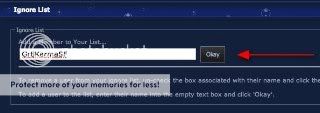
When finished just click the Ok button. BOOM! Problem solved. They will not be able to see any of your threads/posts, any of your messages, and will appear as they are not even here. You will appear the same to them.
This is not permanant, and can be reversed, but use it wisely, as it is very effective.
That concludes our lesson for today!
Special thanks to Gr8KarmaSF for helping me set this up!!!
Cheers!
multi-page bump


.....and on that note I guess I'd better go get ready for work.
Sent from my iPhone using MonsterAquariaNetwork app
Sent from my iPhone using MonsterAquariaNetwork app
